

If your pages aren’t getting indexed or rankings suddenly drop, crawl errors are usually one of the first things you should check. A few broken URLs might not hurt much, but repeated 404, 301, and 500 errors can quietly damage crawling, indexing, and user trust over time.
Here’s the thing: most website owners panic when they see errors inside Google Search Console. In reality, many of them are fixable within a couple of hours once you understand what the error actually means and why it appeared in the first place.
404 errors happen when pages no longer exist, 301 issues appear from bad redirect setups, and 500 errors usually come from server-side problems. In most cases, fixing crawl errors in GSC involves cleaning broken links, improving redirects, checking server logs, and updating your sitemap so search engines can crawl your site properly again.
What Is Crawl Errors Guide: How to Fix 404 301 and 500 Errors in GSC?
Crawl errors are problems that prevent search engines from accessing or understanding your pages correctly. Inside Google Search Console, these errors usually appear under indexing or page-related reports.
When Googlebot visits your website, it expects a clear response. Sometimes it gets one. Sometimes your server says “page not found,” sends users to the wrong destination, or crashes entirely.
That’s where errors like 404, 301, and 500 come into play.
Definition Box:
Crawl Error — A technical issue that stops search engines from properly accessing, indexing, or rendering a webpage.
You’ll often hear related terms like “index coverage issues,” “server errors,” and “technical SEO problems.” They all connect back to the same core issue: search engines struggling to access your content.
Why Crawl Errors Matter in 2026
A few years ago, websites could get away with messy technical SEO. Not anymore.
Search engines have become much stricter about crawl efficiency. If bots waste time crawling broken pages, they may ignore important content altogether. That’s especially true for larger websites with thousands of URLs.
What most people overlook is this: crawl errors don’t just affect rankings. They also hurt user experience.
Imagine clicking a search result and landing on a dead page. You’d probably leave within seconds. Search engines notice those behavior patterns over time.
I’ve seen smaller business sites lose traffic simply because outdated redirects piled up for months. Nobody checked them until rankings started slipping.
Another thing that changed in 2026 is how AI-driven search summaries evaluate site quality. Technical consistency matters more than ever because AI systems prefer reliable, accessible pages with clean crawling paths.
Expert Tip
Don’t obsess over every single 404 error. Some are completely normal. Focus on pages that receive backlinks, traffic, or internal links first. That’s where fixes usually produce the biggest SEO gains.
What Causes 404 Errors in GSC?
A 404 error means the page cannot be found.
Simple enough. But the reasons behind it vary a lot.
Here are the most common causes:
Deleted pages without redirects
Incorrect internal links
Typos in URLs
Broken backlinks from other websites
CMS or permalink structure changes
Migrated pages with missing redirect rules
In most cases, Google discovers these broken URLs through old sitemaps or external backlinks.
Real-World Example
A small ecommerce store removed nearly 300 discontinued product pages during a redesign. No redirects were added. Within two months, organic traffic dropped by around 18%.
Why? Google was still crawling dead URLs heavily because many had backlinks and internal references. Once the site redirected relevant pages properly, indexing stabilized again.
How to Fix 404, 301, and 500 Errors in GSC — Step by Step
1. Identify the Exact Error Type
Open your Search Console coverage or indexing report and review affected URLs carefully.
Don’t assume all errors need the same fix.
404 = missing page
301 = redirect issue
500 = server-side problem
This sounds obvious, but people often apply the wrong solution entirely.
2. Fix Important 404 Pages First
Not every missing page deserves attention.
Prioritize pages that:
Have backlinks
Receive organic traffic
Are linked internally
Previously ranked well
You can:
Restore the deleted page
Redirect it to a highly relevant alternative
Remove broken internal links
Avoid redirecting everything to the homepage. Honestly, that shortcut creates more confusion than it solves.
3. Audit Your Redirect Chains
301 redirects are useful. Messy redirect chains are not.
A redirect chain happens when:
Page A → Page B → Page C
Google can follow redirects, but too many hops slow crawling and weaken page signals.
Ideally, every redirected page should point directly to the final destination.
One weird thing I’ve noticed: many SEO plugins automatically generate unnecessary redirects after slug changes. Site owners rarely notice until crawl reports explode with warnings.
4. Investigate 500 Server Errors
500 errors are server-related. They usually mean your hosting environment failed to process a request correctly.
Common causes include:
Server overload
PHP memory limits
Plugin conflicts
Database connection failures
Timeout settings
Faulty custom scripts
Check your server logs first. That’s usually faster than randomly disabling plugins and hoping for the best.
If errors spike during traffic surges, your hosting setup probably needs improvement.
5. Update XML Sitemaps
Search engines rely heavily on XML sitemaps to discover pages efficiently.
Remove:
Broken URLs
Redirected pages
Non-indexable URLs
Then resubmit the updated sitemap in Search Console.
This step gets skipped surprisingly often.
6. Validate Fixes Inside GSC
After corrections are made, use the validation option in Search Console.
Google will recrawl affected URLs and confirm whether issues are resolved.
Don’t expect instant updates though. Some validations take several days.
Why 301 Redirects Sometimes Hurt SEO
Here’s a slightly unpopular opinion.
Not all 301 redirects are good for SEO.
People assume redirects magically preserve rankings forever. That’s only partly true.
If redirected content no longer matches the original page intent, rankings can still disappear. Search engines evaluate topical relevance, not just redirect status codes.
For example:
Redirecting an old “best gaming laptops” article to a generic homepage probably won’t preserve its visibility.
A closer content match works far better.
Expert Tip
During site migrations, create redirect maps before changing URLs. Trying to repair redirects afterward usually becomes chaotic, especially on large websites.
Common Crawl Error Mistakes Most Site Owners Make
Ignoring Soft 404s
Soft 404s happen when pages technically load but contain little or no useful content.
Search engines may treat them as low-quality dead pages anyway.
Thin affiliate pages often trigger this issue.
Blocking Broken Pages in Robots.txt
This is a classic mistake.
If a broken page is blocked in robots.txt, search engines may never see the correct status code. That can delay cleanup and indexing updates.
Redirecting Everything to the Homepage
Google has openly discouraged this practice for years.
Users hate it too.
A redirected page should feel like a logical continuation of the original content.
Forgetting Internal Links
You might fix external crawl errors but still leave dozens of broken internal links across blog posts and navigation menus.
That creates ongoing crawl waste.
Expert Tips and What Actually Works
In my experience, technical SEO tools sometimes overwhelm beginners because they surface hundreds of warnings that don’t truly matter.
Focus on patterns instead.
Five broken URLs? Probably fine.
Five hundred broken URLs after a migration? That’s a real problem.
Another thing worth mentioning: some 404 pages should stay 404s. If content is permanently gone and no replacement exists, returning a proper 404 status is perfectly acceptable.
People over-correct technical SEO sometimes. Search engines are smarter than they used to be.
I also think website owners underestimate server performance issues. Slow hosting environments quietly create crawling instability long before rankings drop visibly.
One client I worked with had intermittent 500 errors caused by a cheap shared hosting plan. The site technically stayed online most of the time, but Googlebot repeatedly encountered failures during crawling windows. After upgrading hosting, crawl consistency improved within weeks.
That’s not flashy SEO advice, but it matters.
Expert Tip
Monitor crawl stats monthly, not only when traffic drops. Small technical issues often compound gradually before becoming serious ranking problems.
How to Prevent Crawl Errors Going Forward
Preventing errors is easier than constantly repairing them later.
A few practical habits help a lot:
Audit redirects quarterly
Monitor Search Console weekly
Keep internal links updated
Avoid deleting URLs carelessly
Use reliable hosting
Maintain clean sitemap files
Test migrations on staging environments first
Honestly, prevention work feels boring. But it saves massive cleanup time later.
People Most Asked About Crawl Errors Guide: How to Fix 404 301 and 500 Errors in GSC
Why do 404 errors keep appearing in GSC after fixing them?
Google may continue reporting old URLs until it recrawls them several times. Cached reports can linger for weeks. Usually, if the page now returns the correct response or redirect, the issue eventually disappears.
Are all 404 errors bad for SEO?
No. Some 404 pages are completely natural. Problems arise when important pages with backlinks or internal references return errors without proper handling.
What’s the difference between 301 and 302 redirects?
A 301 redirect signals a permanent move, while a 302 indicates a temporary one. For long-term URL changes, 301 redirects are generally the better option for SEO.
Can server errors reduce rankings?
Yes, especially if they happen repeatedly. Search engines may reduce crawling frequency or treat the site as unreliable if 500 errors persist for long periods.
How often should I check crawl errors?
For most sites, once per week is enough. Larger websites with frequent content updates may need daily monitoring.
Should I redirect deleted pages or leave them as 404?
It depends on relevance. If a similar replacement page exists, redirecting makes sense. If the content is permanently removed with no alternative, a proper 404 is usually fine.
Why do redirect chains happen?
They often build up gradually during redesigns, CMS changes, or repeated URL edits. Over time, multiple redirects stack together unless cleaned regularly.
Final Thoughts
Fixing crawl errors in GSC isn’t about chasing perfect technical scores. It’s about helping search engines and users access your content smoothly without friction.
404 errors need thoughtful handling, 301 redirects should stay clean and relevant, and 500 server problems deserve immediate attention before they affect indexing. Once you build regular monitoring habits, technical SEO becomes much easier to manage.
Most websites probably don’t need advanced enterprise-level audits. They just need consistency.
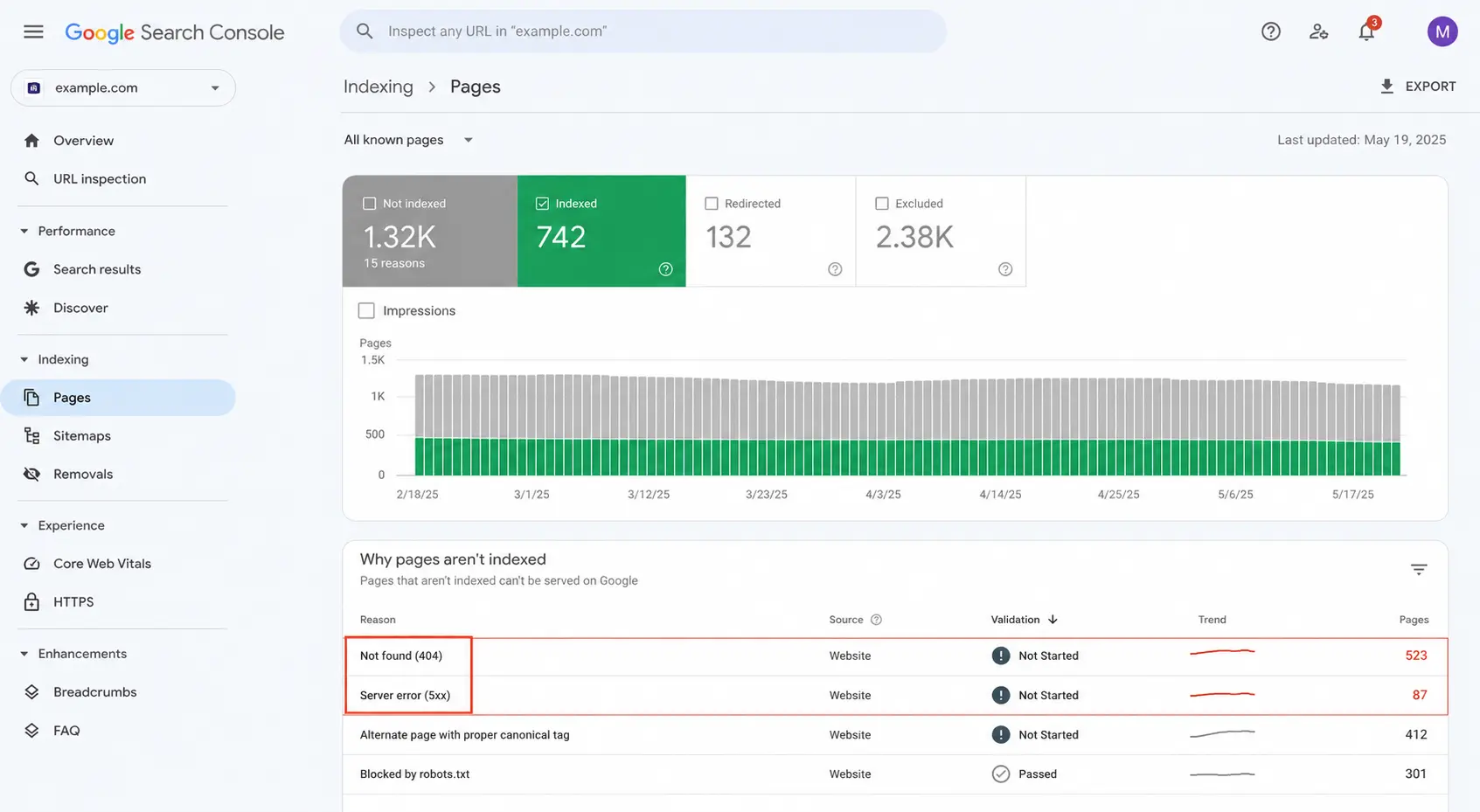
Google Search Console crawl errors dashboard showing 404, 301, and 500 error reports
Businesses, agencies, and startups looking for stronger online exposure can boost brand visibility and organic traffic through press release distribution services combined with advanced SEO services. From instant publishing to high authority backlinks and wider media coverage, these platforms help improve SEO ranking while building long-term digital credibility for brands and bloggers alike.